Illustration: glass steps rising into light
StepWise · Malaysia

IEP software for special-education centres in Malaysia.

Plan each IEP from your centre’s own goal pool with an AI that shows its sources, then track every goal with one tap — for special-education and therapy centres across Malaysia.

Web app · iPhone & Android · English or Bahasa Melayu

Web and phone

Two apps, one record for every child.

Web app

For the centre

Student records, the IEP studio, approvals, the dashboard and reports, in the browser.
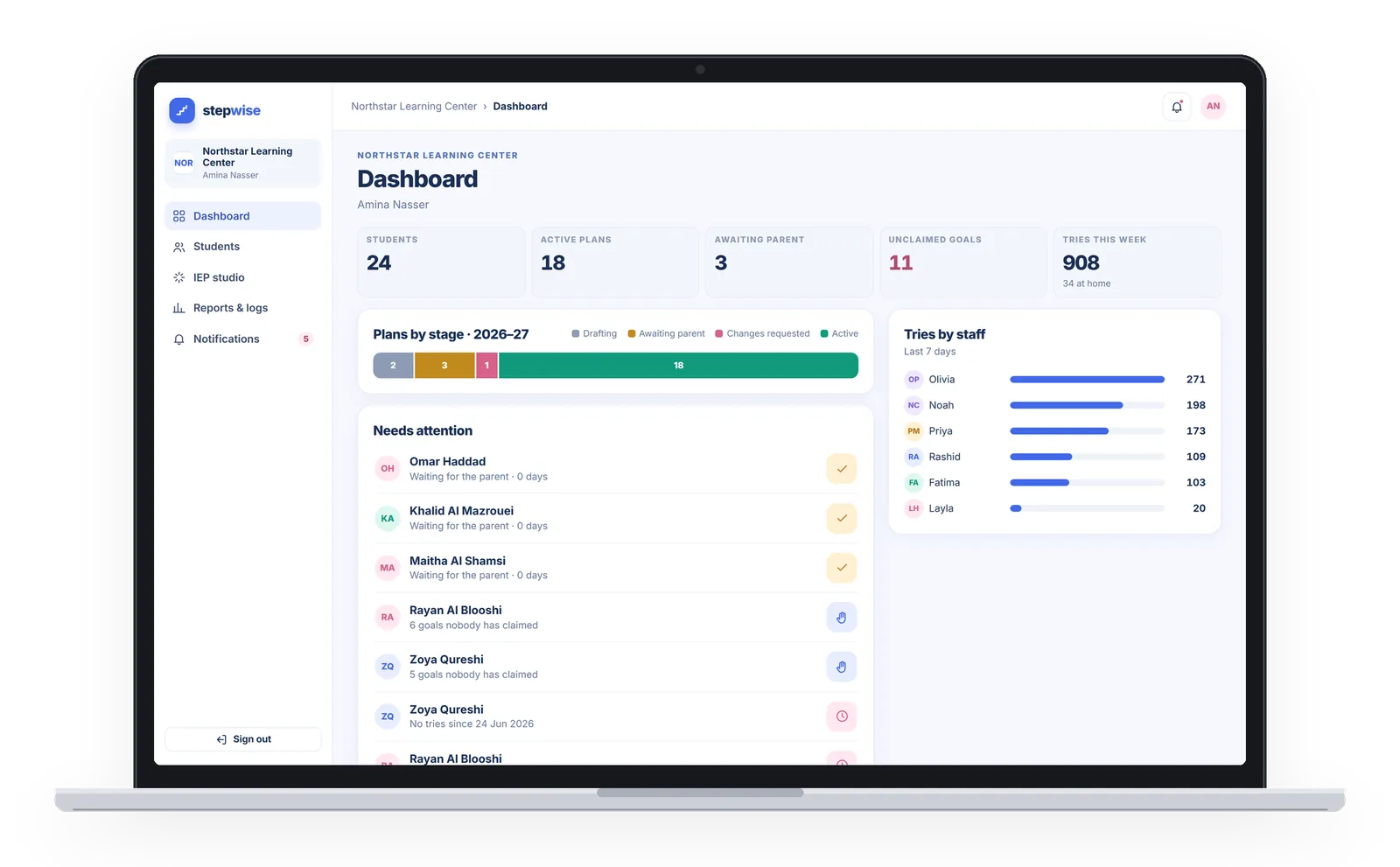
StepWise web app: the IEP coordinator’s dashboard
The coordinator’s dashboardScreens are from a demo centre; every name is fictional.
Phone app · iPhone & Android

For therapists, teachers and parents

Staff log each try during the session. Parents approve plans and log practice at home.
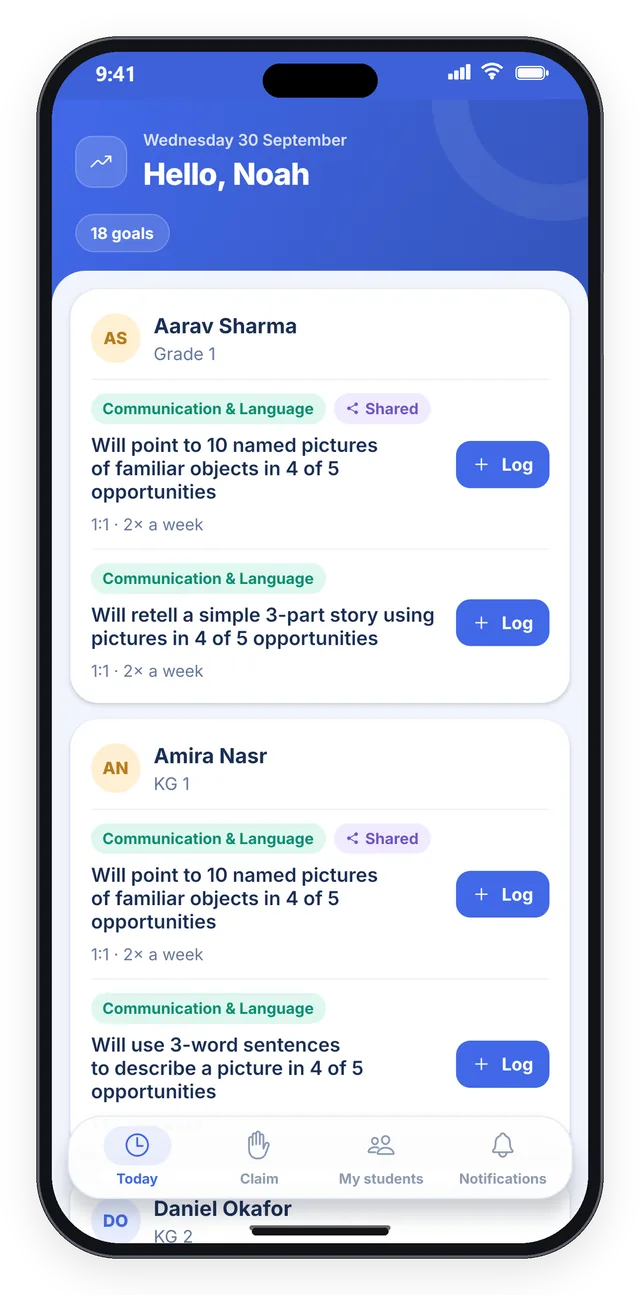
StepWise phone app: a therapist’s Today screen
Today, on a therapist’s phone
Sound familiar?

Great sessions. Scattered records.

01

Plans rebuilt from scratch

Every new IEP starts as a blank document, even though your goals already live in your curriculum.

02

Tracking on paper and spreadsheets

Tallies on a clipboard, typed up after the session if there is time, and hard to add up at the end of term.

03

Parents see progress at report time

Families wait for the report to find out whether a goal is moving.

StepWise keeps the plan, the session data and the family in one place, from the first assessment to the annual report.

How it works

Seven steps, from records to results.

Each step picks up where the last one ended.
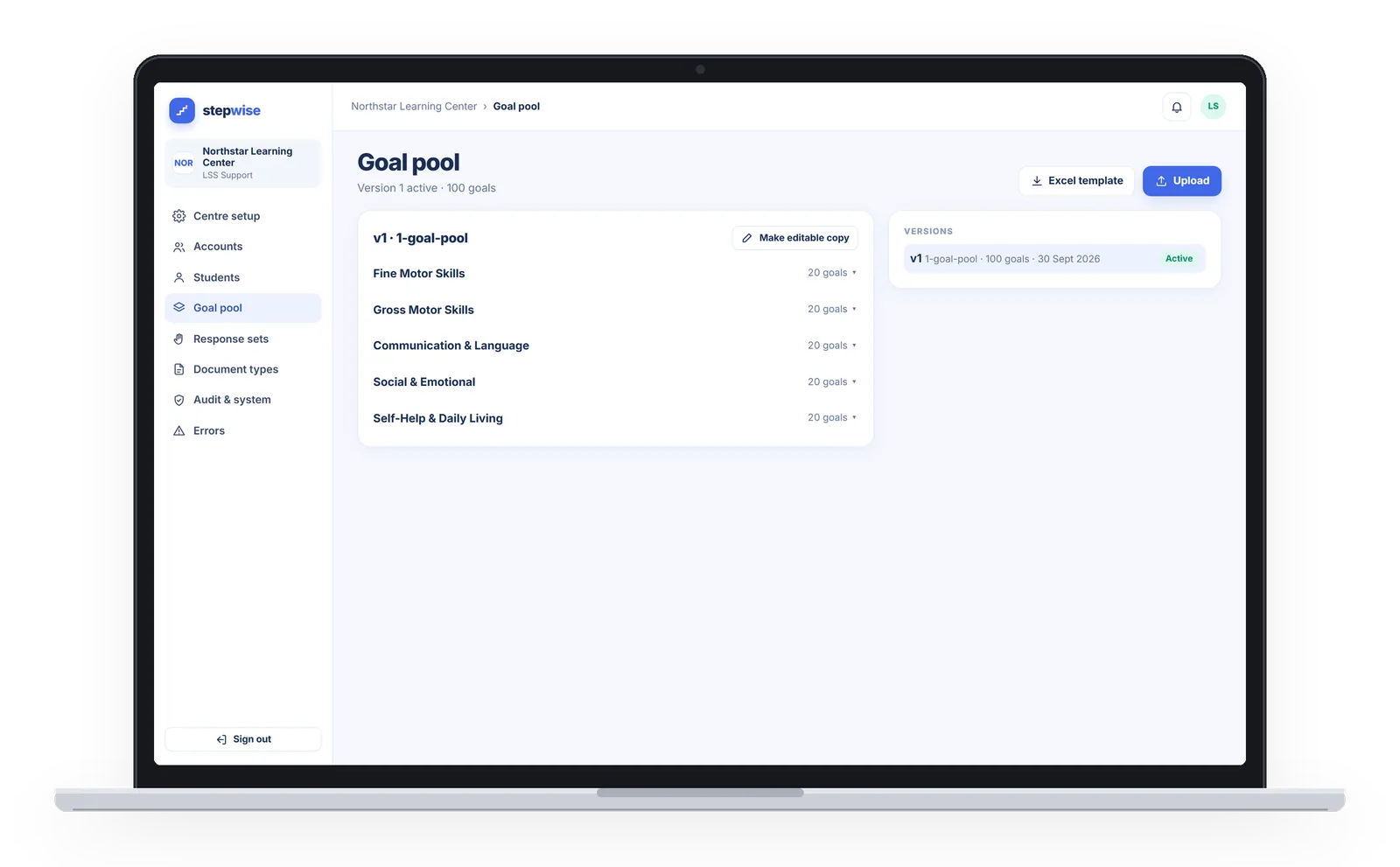
  1. StepWise web app: a centre’s goal pool
    01

    Your goals and records

    Lite Software Solutions (LSS) loads your goal pool from your own curriculum. Each student gets a record, with their documents filed by year, month and type.
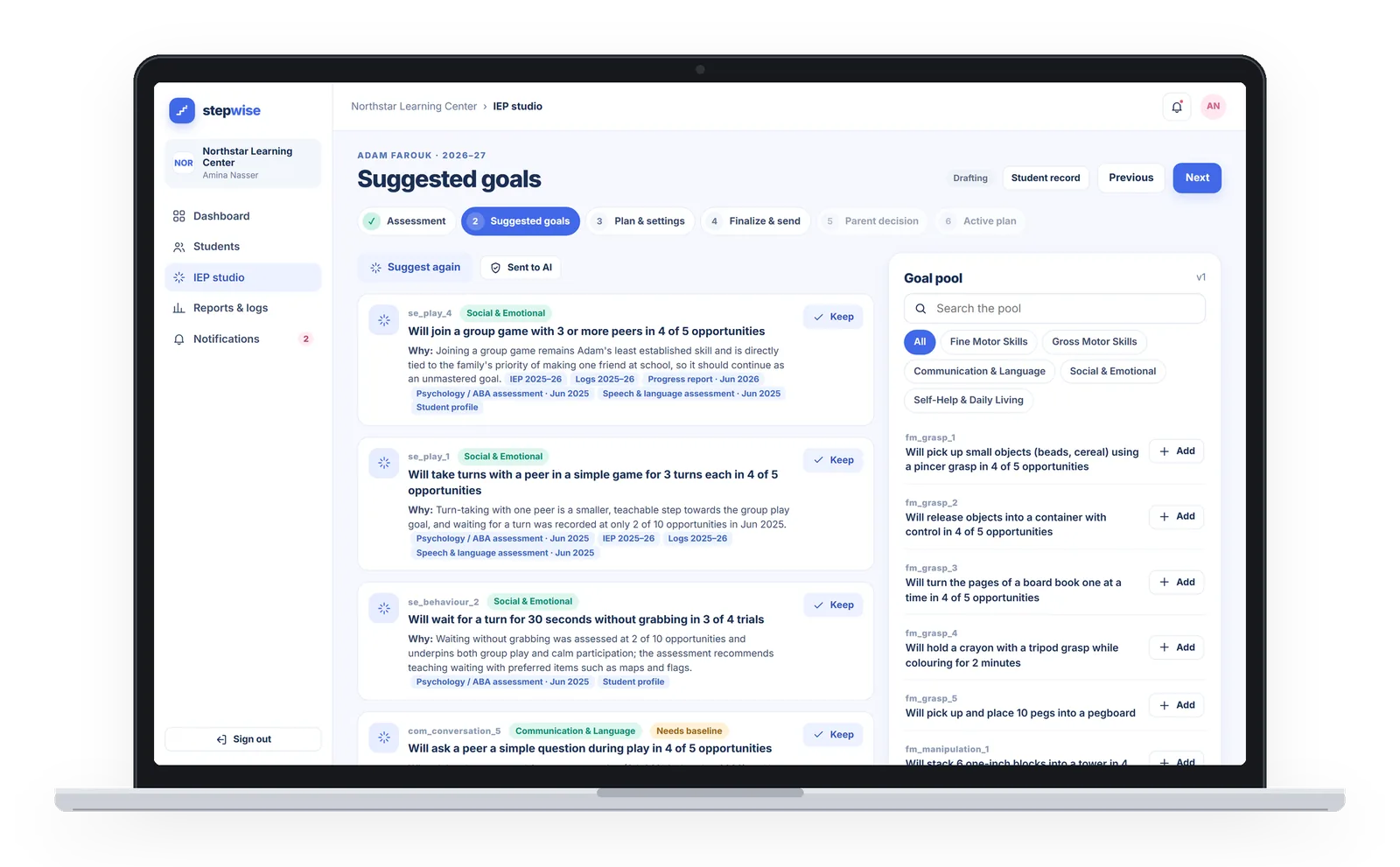
  2. IEP studio: suggested goals from the centre’s pool, each with a reason
    02

    An IEP draft with sources

    The AI summarises the assessment and suggests goals from your pool, each with a reason and its sources. Your coordinator edits and confirms.
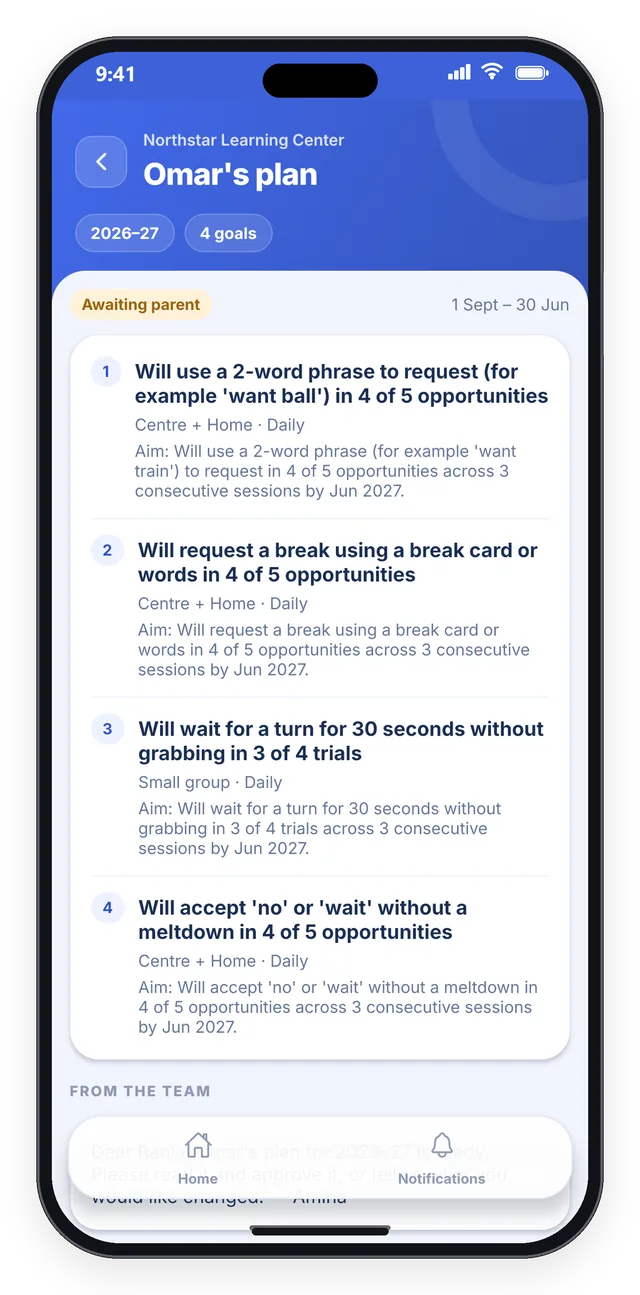
  3. StepWise phone app: a parent reviewing a plan
    03

    Parents approve

    The family reviews the plan on their phone, then approves it or asks for changes.
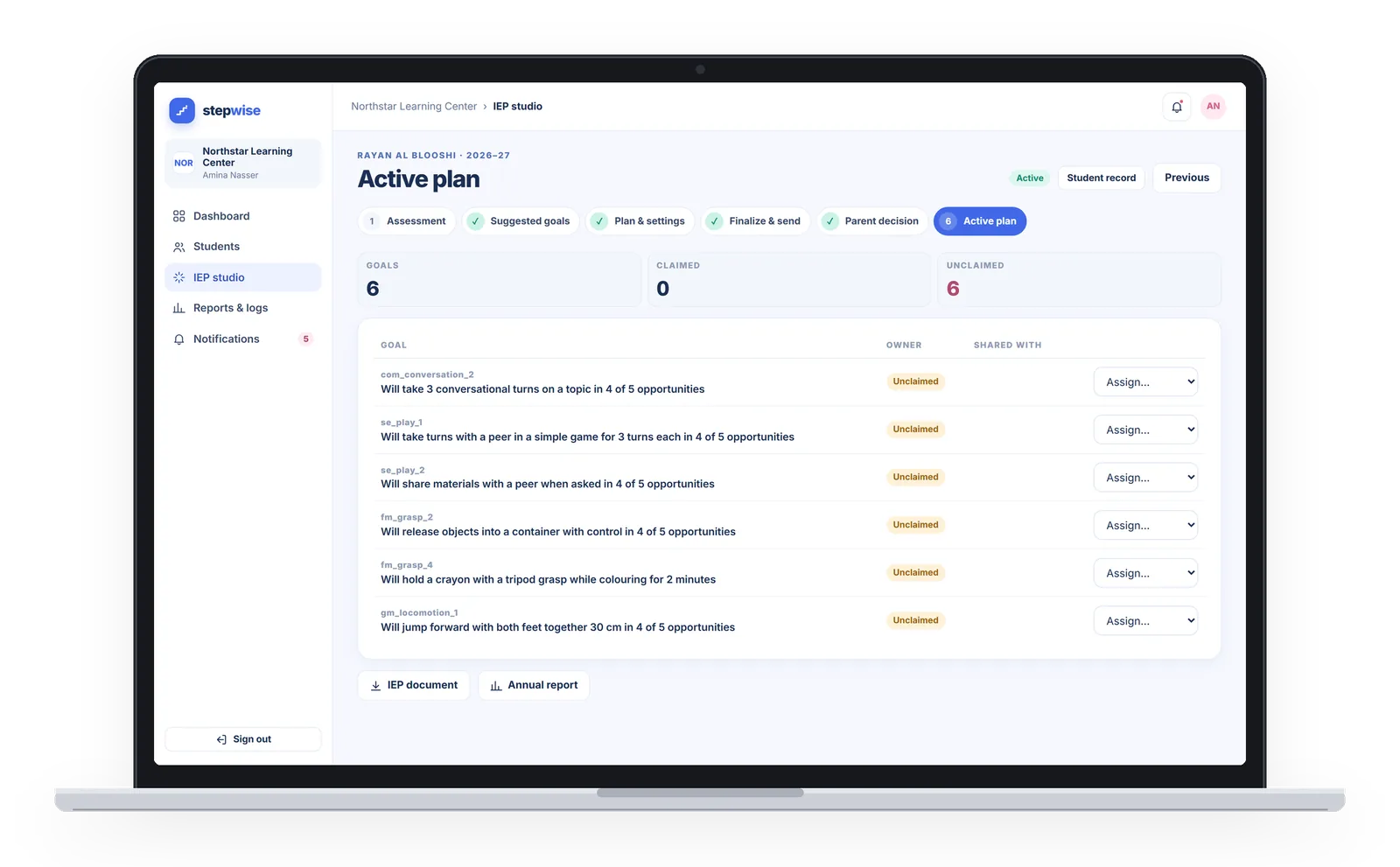
  4. IEP studio: the claim board, where staff claim goals
    04

    Staff claim goals

    Therapists and teachers claim the goals they will work on. The coordinator can assign or change them.
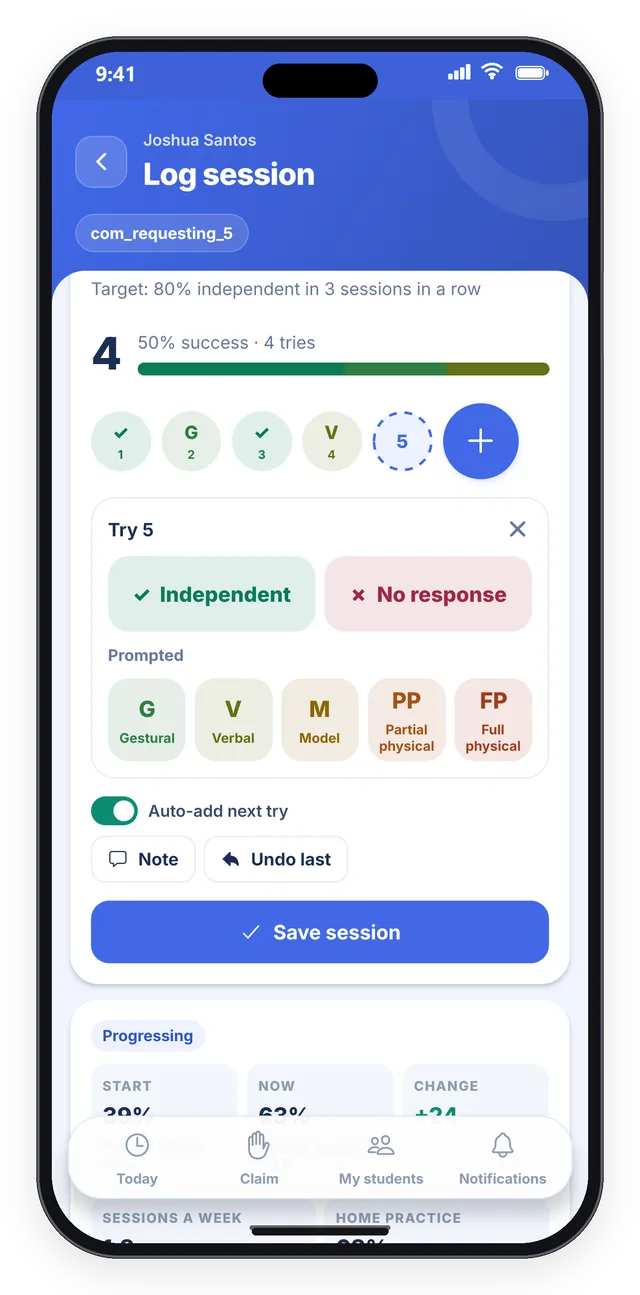
  5. StepWise phone app: the logging pad for a goal
    05

    One tap per try

    In the session, ⊕ adds a try and one tap records the answer. Or record a clip and confirm the tries the assistant finds.
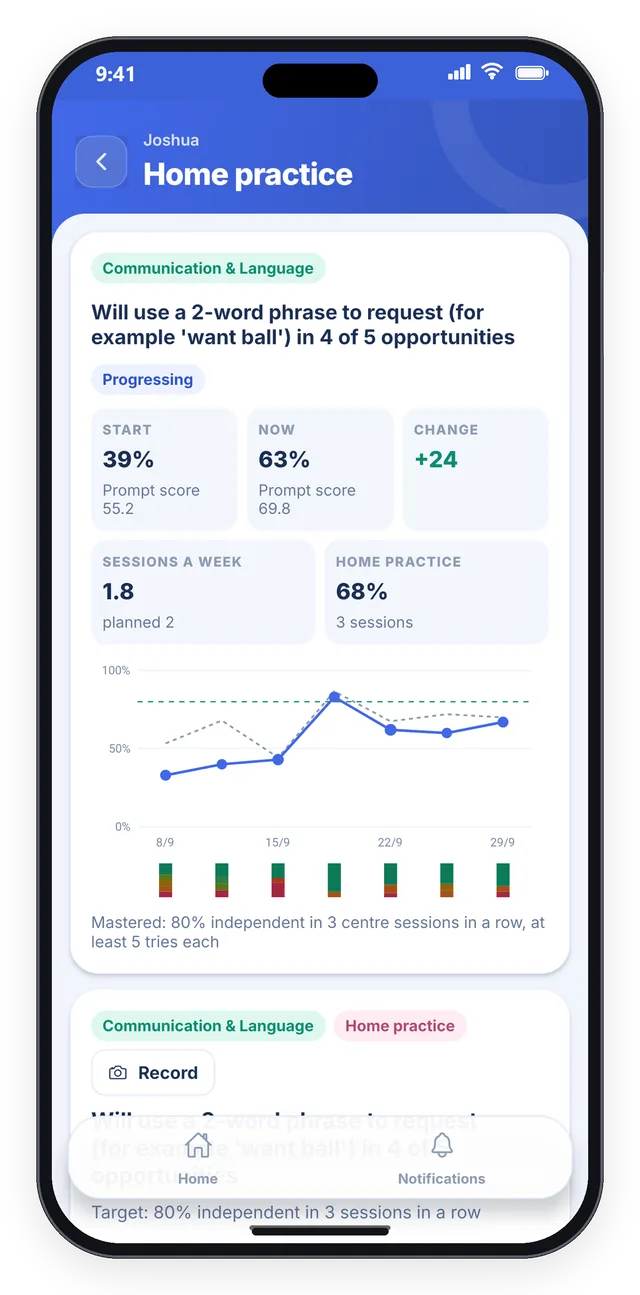
  6. StepWise phone app: a parent logging home practice
    06

    Practice at home

    Goals you share appear in the parents’ app, and they log home practice there.
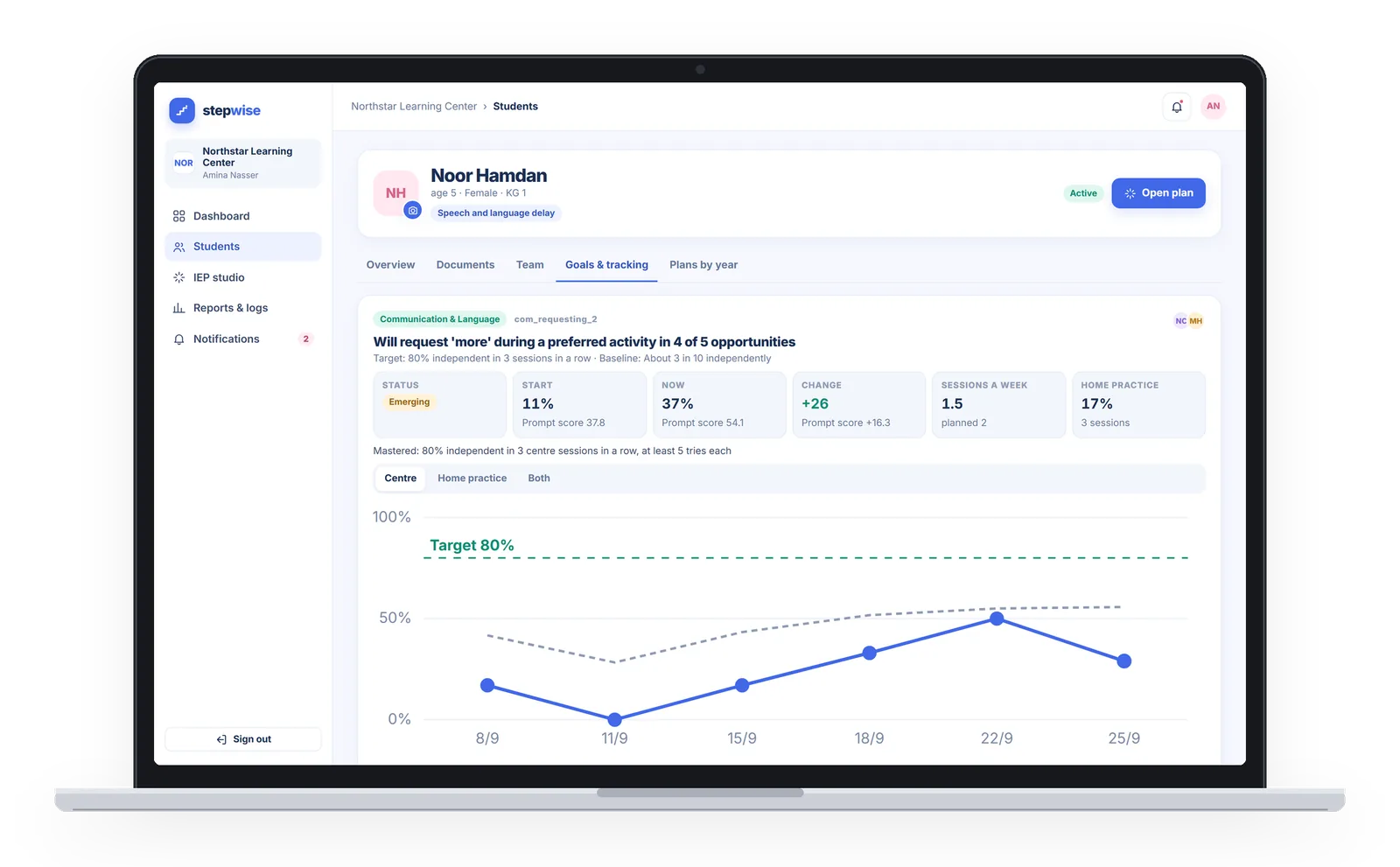
  7. StepWise web app: goal charts from start to now, with prompt levels
    07

    Mastery and reports

    Progress, mastery and reports are worked out from the tries your team logs.

  8. Every step, in detailThe full walkthrough, with the screens for each role, through to year two.See how it works →
Across Malaysia

Working with centres across Malaysia.

We work with special-education and therapy centres across Malaysia, remotely and on site when needed, starting in the Klang Valley: Kuala Lumpur, Petaling Jaya, Shah Alam, Subang Jaya and Cyberjaya, then the rest of Malaysia, including Penang, Johor Bahru, Ipoh, Kota Kinabalu and Kuching.

Each centre runs in English or Bahasa Melayu, one language per centre, and its reports come out in that language.

Who uses it

A view for every role.

Everyone signs in to their own view, and sees only what their role allows.

  • Web

Centre admin

Runs the centre: the dashboard, students, teams, parent logins and reports.

  • Web

IEP coordinator

Owns the plans: student records, the IEP studio, approvals and reports.

  • Phone
  • Web

Therapists & teachers

Work from their Today screen, claim goals and log each session as it happens.

  • Phone

Parents

Approve plans, follow the goals shared with them and log practice at home.

Staff see only the students on their teams. Parents see only their own children, and progress only on the goals shared with them.

AI with sources

AI that shows its sources.

StepWise drafts. Your coordinator decides. Its summaries and goal suggestions point back to where they came from.

  • Documents are read by code first: the text layer, then OCR in English.
  • Fact cards are exact quotes. Code drops any quote that is not really in the document.
  • The assessment summary cites its sources. Your coordinator edits it and confirms.
  • Goals are suggested only from your centre’s own pool, each with a reason and its sources.
  • Changes asked for in the plan chat arrive as proposals you accept or reject.
  • AI can be switched off, or run privately on your own AI supercomputer.
Illustration: a glass page threading into five quote cards
In the session

One tap per try.

Therapists log while they work, not after. ⊕ adds a try, and one tap answers it.

With the prompt hierarchy, most independent first:

  1. Independent
  2. Gestural
  3. Verbal
  4. Model
  5. Partial physical
  6. Full physical
  7. No response

Or with the goal’s own response set:

  • Count
  • Duration
  • Yes / No

Or record or upload a clip, and the assistant proposes the tries for a person to confirm. It uses only the speech, transcribed inside your centre’s own system, with names, contact details, ID numbers and addresses replaced before any AI step.

At home

Practice at home, on the same goals.

Share a goal with a parent and it appears in their app. They log home practice there, and it shows alongside centre sessions. It never decides mastery.

Illustration: a glass centre and a small house joined by a path of light
Results

Results you can defend.

Mastery follows a clear rule, and progress is worked out from the tries your team logs.

  • Mastery, by default, is 80% independent across 3 consecutive centre sessions of at least 5 tries each. The rule is set per goal while the plan is drafted.
  • A prompt-level score from 0 to 100, with Independent at 100, shows prompting fading over time.
  • Home practice is shown alongside, and never decides mastery.
  • Corrections to a logged try need a reason.
StepWise web app: goal charts from start to now, with prompt levels
Goals and tracking: each goal from start to now
Illustration: a sealed glass cube with one glowing server inside, standing for a centre’s own isolated deployment
Your data

StepWise’s AI never learns who your students are.

Your own deploymentEach centre gets its own app, database, file store and secrets, and no data is shared between centres. It is hosted in your region, and in-country wherever a suitable data centre is available, to meet your data requirements.
Names removed before any AI stepNames, contact details, ID numbers and addresses become placeholders inside your centre’s own system, and dates keep only the month and year, so the AI only ever receives anonymised text, never files.
AI your wayCloud AI that sees only anonymised text, private AI on your own AI supercomputer for total sovereignty, or no AI at all. One-tap logging and mastery results never depend on it.
Your data, under Malaysian rulesMalaysia’s Personal Data Protection Act 2010 sets rules for personal data. Your data stays on systems you control. This is general information, not legal advice.
Setup & support

We set up your centre with you.

  • Your own isolated deployment, in your region and in-country where a data centre is available
  • Your centre’s name, accent colour and language
  • Your goal pool, loaded by LSS from your own curriculum
  • Staff, student and parent accounts imported from Excel templates
  • Response sets and document types set up for you
  • Role-based training for centre admins, coordinators and therapists, and a quick-start for parents
  • First-month go-live support: priority help in your first 30 days
  • Your past IEPs and assessment reports uploaded into each student’s record
Questions

StepWise in Malaysia: common questions

Does StepWise work for special-education centres in Malaysia?
Yes. We work with centres across Malaysia, remotely and on site when needed, starting in the Klang Valley (Kuala Lumpur, Petaling Jaya, Shah Alam, Subang Jaya, Cyberjaya) and then the rest of Malaysia.
Which languages does StepWise support for a Malaysian centre?
English or Bahasa Melayu. Each centre runs in one language, and its reports come out in that language.
Where is our centre’s data hosted?
In your own isolated deployment: its own app, database, file store and secrets, shared with no other centre. Malaysia’s Personal Data Protection Act 2010 sets rules for personal data; your data stays on systems you control. This is general information, not legal advice.
Does the AI choose our goals?
No. It suggests goals only from your centre’s own goal pool, each with a reason and its sources. Your coordinator edits and confirms the plan, parents approve it, and the AI can be switched off for your centre.
Does the AI see children’s names?
No. Before any AI step, names, contact details, ID numbers and addresses become placeholders inside your centre’s own system, and dates keep only the month and year, so the AI only ever receives anonymised text.
Can the AI run entirely inside our centre?
Yes, as a separate option. Private AI runs StepWise’s AI on a dedicated AI supercomputer at your centre or an in-country data centre, so no text goes to an outside AI provider.
How much does StepWise cost for a Malaysian centre?
Pricing is fixed after our first conversation, once we know your centre’s size and needs. See the StepWise overview for what is included.
Book a demo

See StepWise in action.

Tell us a little about your centre and we will arrange a demo. We reply within 24 hours.

Based in
SRTIP, Sharjah, United Arab Emirates · working with centres across Malaysia, remotely and on site when needed

We use your details only to reply. Privacy policy